
When programming an activity, a number of different question types can be used. The following lists all available question types with a high level overview. For additional programming details, click on the individual articles links to read more.
Available Question Types by Activity Type
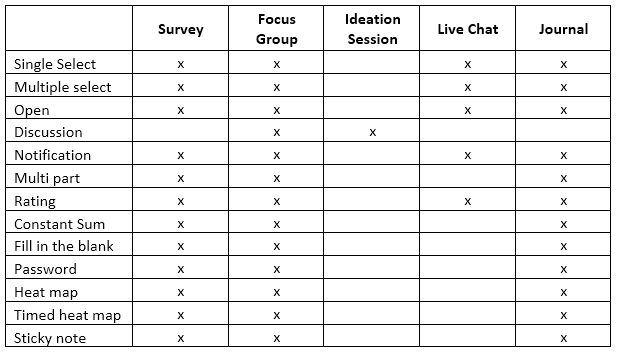
Single Select:
A single select question is one of the most frequently used question types. As the name indicates, it allows the respondent to select one answer choice out of a list of choices. Read more about set up and programming options here.
Multiple Select:
A multiple select question typically has three or more choices. Multiple choice questions can be asked a matrix multiple select. It is important to include an Other or Don’t know/Unsure choice in this type of question. Read more about set up and programming options here.
Open Ended:
An open ended question will help you to explore a qualitative, more in-depth response to a particular question. Read more here.
Discussion:
Similar to an open end question. A discussion type question will first appear to users in the form of an an open ended question. Once they complete the entire activity, they will be able to see other users' responses and can comment and vote on each other's responses as well. Read more here.
Notification:
A notification type question will allow you to display a message, image or video without respondents having to make a selection. Read more here.
Multi-Part:
A multi-part question will allow you to capture address, phone number or age. Read more here.
Rating:
A rating type question will allow respondents to rate or compare a product or brand. Read more here.
Constant Sum:
A constant sum type question allows you to look at ratios when analyzing data. You set a fixed sum that users distribute across several choices. Read more here.
Fill in the Blank:
A fill in the blank type question allows the respondent to fill in a blank field with text and gives you the creativity to create a mad libs type question. Read more here.
Password:
A password type question will let respondents can enter a specified password created by the admin. Or, the admin can upload a list of unique passwords and require the respondent to input a specified password in order to advance in the survey. Read more here.
Heat Maps: (Standard, Timed, Sticky Note)
There are three different types of Heat Maps called Heat Map (standard), Timed Heat Map and Sticky Note:
- Standard: Users are able to place markers on an image share with them. You can create categories you want users to mark on the stimuli – like/dislike, where would you click to edit your card, etc.
- Timed: The image is blacked out and has a count-down timer when users click to begin. With this Heat Map option, you have the ability to time how long it takes and in what order users find and mark options on the stimuli. This is used for testing A/B web page mock-ups, brand preference and so forth.
- Sticky Note: Allows users to add a "Sticky Note" to each marker they place to add the "why" to the marker and context to your analysis.
To read more about programming heat maps, click here.
Continue reading:
Comments
0 comments
Article is closed for comments.