
Rating questions are a useful tool for having respondents assess value on one or more attributes or objects on an interval scale, using shapes as the rating tool. Rating questions can be used to capture:
- Satisfaction
- Purchase Intent/Likelihood
- Value
- Importance of Attributes or benefits
Two Types of Rating Questions
Single Rating: This question type allows respondents to rate one object or attribute using the specified number of rating shapes.
Rating with Matrix: This question type allows respondents to rate two or more objects or attributes using the specified number of rating shapes.
Programming Steps
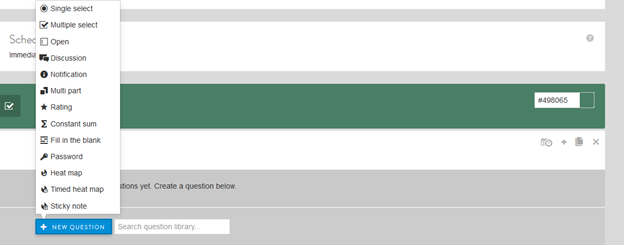
From the New Question dropdown menu, select Rating.
Next, fill in:
- Question text and a label, if desired (labels are not shown to respondents but can be used for back-end reporting).
- Select checkbox if you want to make the question required (all have to answer it to go to the next survey screen).
- Choose type of Shapes (heart, star, dollar, smile, check, exclamation, plus, minus).
- Number of ranks is set at 5 as default but you can choose any level from 1 to 10.
Other options include:
- Add "why" field to get open-ended feedback on why members select a certain rating
- Select clip icon to attach an image or video, if desired.
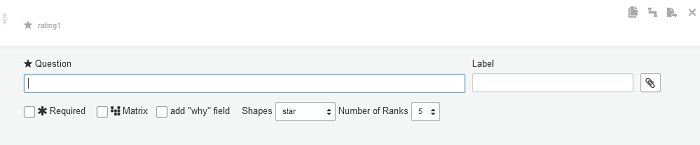
- Selecting the "Matrix" checkbox allows you to switch from Single Rating to Rating with Matrix.
- The choices or ROW dialog will appear. Enter attributes or statements you would like to test.
- You may add choices by typing in one at a time and choosing the + sign in the blue box to add others or simply press ENTER when done typing each choice. You may also choose BULK ADD to paste in a list of choices from another source. Again, labels can be added, if desired (labels are not shown to respondents but can be used for back-end reporting).
- Select clip icon to attach an image or video, if desired.
- Row choices can be randomized, if applicable to research needs.
- Click FINISHED to save the question.
Example Set Up: Single Rating
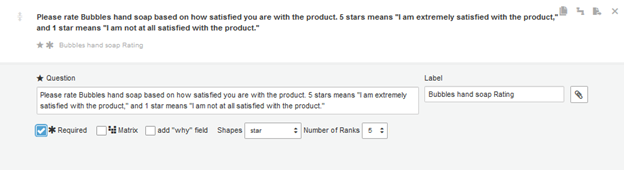
Shown below is the programming for a required Rating question, where the respondents will be able to give one rating by selecting a number of stars (up to 5) for the product shown:
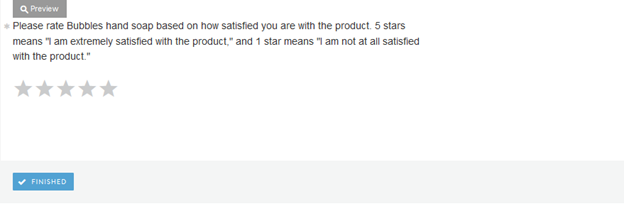
The Preview for the above programmed question looks like this:
Example Set Up: Rating with Matrix
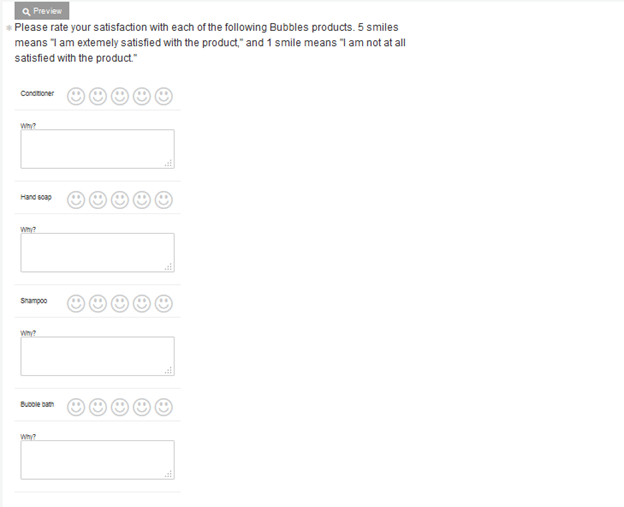
Shown below is the programming for a required Rating with Matrix question, where the respondents will be able to make one rating selection by selecting a number of smiles (up to 5) for each of the four products shown. By selecting the "add why field," respondents will also have an open end question after each product rating.
Note: as with other question types, the "why" field is not required even if the overall question is set as a required question.
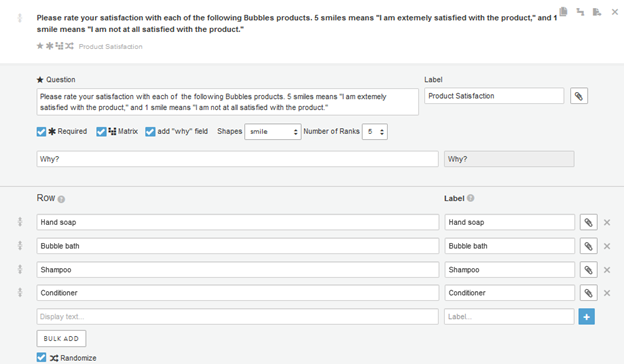
The preview of the programmed question is below:
Continue reading:
For more details see:
Comments
0 comments
Article is closed for comments.