
Notifications are a great way to convey written and visual information to the respondent. Notifications can be used as a precursor to a question, or series of questions, or may just be used to convey information. Examples include:
- Introductions and Conclusions
- Concept Statements
- Concept Images
- Product, Brand, Company Information/Description, etc.
- Videos and/or Images
Programming Steps
From the New Question dropdown menu, select Notification.
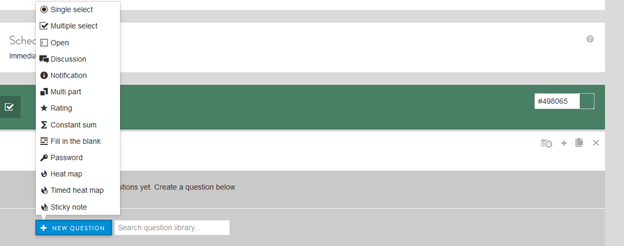
Next, enter and update the following:
- Notification text
- Select the clip icon to the right of the text to add image or video, if desired. The selected file will show underneath the notification text box.
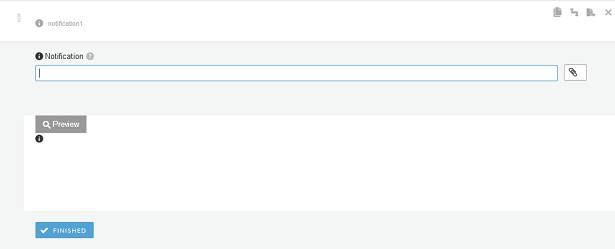
Once set-up is complete, the Preview below will show how the notification will appear on the survey platform.
Example Set-up
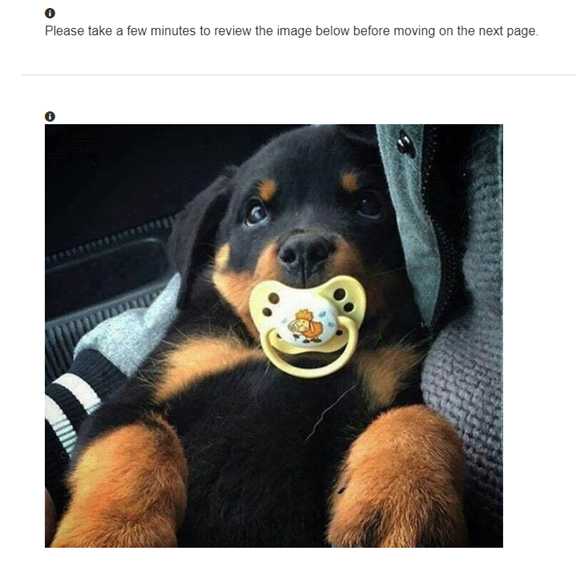
Example set up and preview are shown below with the inclusion of an image:


- A new Notification must be programmed for each image or video. Only 1 attachment can be uploaded per Notification question.
- Images/videos will always be shown above the Notification text, as shown in the above example. In some cases, you will want the attached an image or video below the notification language. To do this, simply program 2 Notification questions: The first Notification for the text, and the second for the attachment. See below for an example.
Continue reading:
Comments
0 comments
Article is closed for comments.