
What is a timed question?
This allows an administrator to display an image to the respondent for a specific number of seconds and then ask a follow up question on the image displayed.
A timed question can automatically display the image (“autoplay” check box), or the respondent will have to press the "Play" button to see the image (default setting).
After the image has been displayed to the user, the administrator will then ask a question based on the image. The question will appear after the image has been shown for a specific number of seconds. The follow up questions must be programmed on the next page.
Creating a timed question:
The administrator will now have the option to select a timed question when creating a new question.
Below is a screenshot where the administrator will be able to select the "Timed" question.
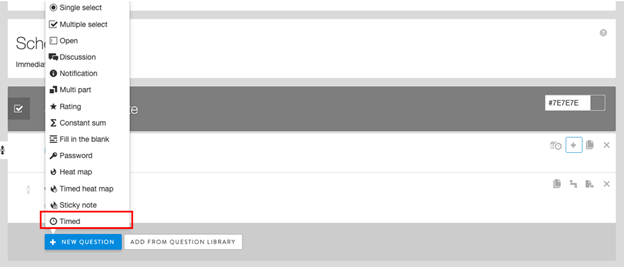
Once the administrator has selected "Timed", a new screen will appear where the administrator will create and choose the options for the timed question.
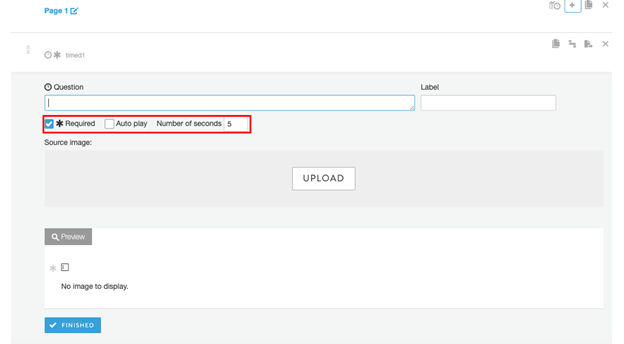
The administrator will be able to:
Enter the "Question" to be displayed before the image is displayed (respondent facing).
Enter the "Label" (internal only; non-respondent facing)
By selecting "Auto play" the timed question automatically displays the image to the respondent when she reaches the timed question page. Once on the page, the platform will buffer for about 5 seconds before the image is automatically shown to the respondent for the set programmed time.
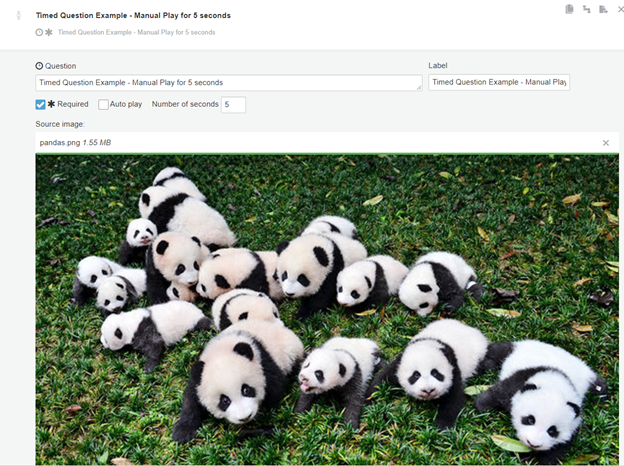
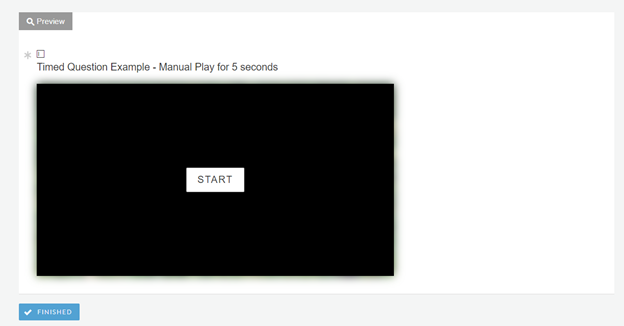
By not selecting "Auto play" the respondent will have to manually play the image when the respondent has reached the timed question. They must click on the “Start” button shown on the page.
By selecting "Number of seconds" the administrator will determine the number of seconds the image will be displayed to the respondent. Minimum # of seconds is 5.
By selecting "Upload" the administrator will be able to upload the image to be displayed.
By selecting "Start" the administrator will be able to preview the question and image display.
When the administrator has completed the timed question, the administrator will select "Finished"
The administrator will have to create a separate page for the follow up questions e.g. if the Timed Question is programmed on Page 2, the follow up questions must be programmed on Page 3. Note: You can program Notification questions on the same page as Timed Questions if you need to include instructions/additional language.
Comments
0 comments
Article is closed for comments.