
"Based-On" allows you to display answer choices from earlier questions in the survey. This can be used in three different ways:
- Display all answer choices selected by a respondent from a previous question.
- Display all answer choices NOT selected by a respondent from a previous question.
- Display all answer choices from a previous question regardless of respondent selection.
Creating Based-On Rule
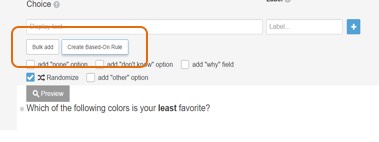
- Create a new question in a new page. Click "Create Based-On Rule" below the "Choice" text box.
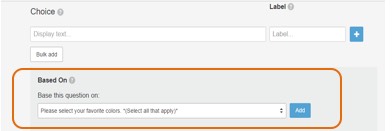
- A dropdown box will appear that allows you to select the question that this new based-on rule will pull data from. In this example, we are selecting the question: "Please select your favorite colors." This question needs to be on a separate page within the activity.
- Next, click "add."
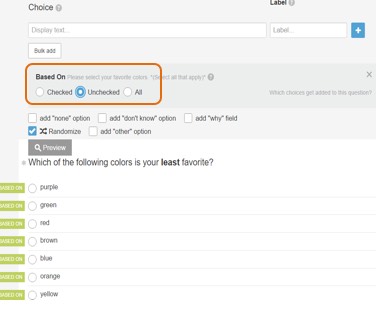
- Choose when you want to show choices: if respondents check the choices in the earlier question, do not check them, or show all choices regardless of user selection.
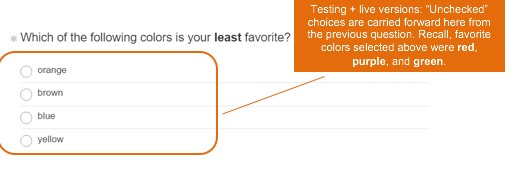
- For this example, we assume that we want to garner feedback on respondents’ least favorite color. Therefore, we will select “Unchecked.” In this case, all color choices which were not selected (or “unchecked”) from the previous question will carry forward into this question’s answer choices.
- The answer choices of the "color" question will now appear in the preview window. To indicate that the choices are dependent on an earlier question, yellow labels that read "Based-On" will show next to each label. If answer choices are added to the question that are not using "Based-On", they will also show in the preview, but without the "Based-On" label next to them.
Testing Based-On Rule
- The overview tab will NOT display "Based-On" choices. During testing, and in the live version, answers will populate using the Based-On rule set up in the activity.
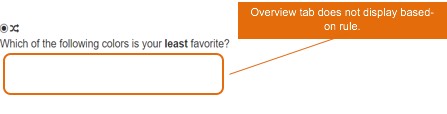
- Always test your survey to be sure the intended functionality is working properly.
Tips and Applications
You can apply both a piping token and a Based-On rule in the same question. This is useful for scenarios where you want to pipe in question text or user selections from different questions. Read more here.
Continue reading:
For more details see:
Comments
0 comments
Article is closed for comments.