
You can use syntax to achieve basic text formatting, such as bold, italics, underline, different font sizes for headings and paragraph formatting.
Text Styles
You can indicate emphasis with bold, italic, underline, or strikethrough text.
Italic
*text*
Example:
- Type this: Surveys are *fun to program*!
- See this: Surveys are fun to program!
Bold
**text**
OR
__text__ [use 2 underscores before and after the text to be bolded
Example:
- Type this: Surveys are **fun to program**!
- See this: Surveys are fun to program!
Bold AND Italics
***text**
Example:
- Type this: Surveys are ***fun to program***!
- See this: Surveys are fun to program!
OR
**text__more text__text**
Example:
- Type this: **This text is __extremely__important!**
- See this: This text is extremely important!
Underline
<u>text</u>
Example:
- Type this: Surveys are <u>fun to program</u>!
- See this: Surveys are fun to program!
Strikethrough
~~text~~
Example:
- Type this: ~~This was mistaken text~~
- See this: This was mistaken text
Headings
There are a couple of ways to edit font size for headings:
1. Using # symbol
To format a heading, add one to six # symbols before your heading text. The number of #'s you use will determine the font size of the heading, with 1 # yielding the largest and 6 #'s yielding the smallest.
# The largest heading
## The second largest heading
###### The smallest heading

2. Using Html code
To format the heading use <H1> through H6>, with <H6> the smallest. The appropriate html code needs to be included at the beginning and end of the heading.
<H1>This is Heading 1</H1>
<H2>This is Heading 2</H2>
<H3>This is Heading 3</H3>
Paragraph Formatting
Start a new paragraph
Example:
- Type this: <p>Paragraph text here</p>
Create an ordered list
+ text
Example:
- Type this:
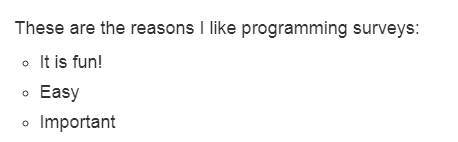
These are the reasons I like programming surveys:
+ It is fun!
+ Easy
+ Important
See this:
Comments
0 comments
Article is closed for comments.