
Congratulations! Your activity has been launched and now you want to review the garnered data. The first step is to get a high-level view of the activity through the Results Tab – Overview landing page. The following sections will provide an overview of the information and statistics available for the different activity types.
The detailed results can be found on the Results tab within the activity, read more here.
Surveys/ Focus Groups
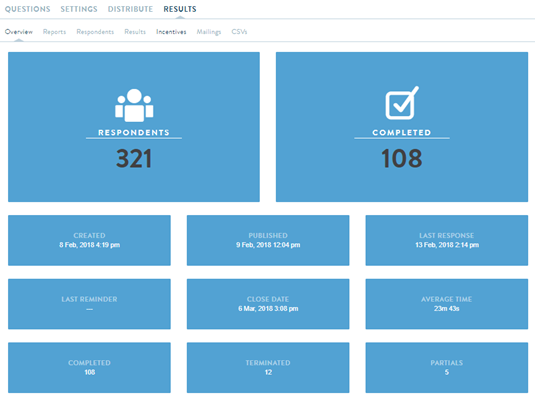
Respondents: Reflects the total number of members that have been included to the activity, whether they have been actively invited (sent an email invitation) or not.
Completed: Reflects the total number of members that have qualified for and completed the activity.
Created: Reflects the date and time when this activity was first created in the "Feedback" tab.
Published: Reflects the date and time when this activity was set to "Active."
Last Response: Reflects the date and time when the most recent member entered a response. This counts all responses regardless of respondent completion status.
Last Reminder: Reflects the date and time when the most recent reminders were sent. If no reminders have been sent, this section will remain empty.
Close Date: Reflects the date and time when the activity was set to "Closed."
Average Time: Reflects the average amount of time to complete the activity based on those who completed.
Completed: Reflects the total number of members that have qualified for and completed the activity.
Terminated: The number of members that began taking the activity but ultimately terminated due to screening criteria in place.
Partials: The number of members that have started the activity but ultimately did not complete. This number does not include members who have terminated or "Skipped to Finish."
Ideation Sessions
Nearly all the Results Overview information for Surveys/Focus Groups are also shown for Ideation Sessions. The following covers four sections which are unique to Ideation Sessions.
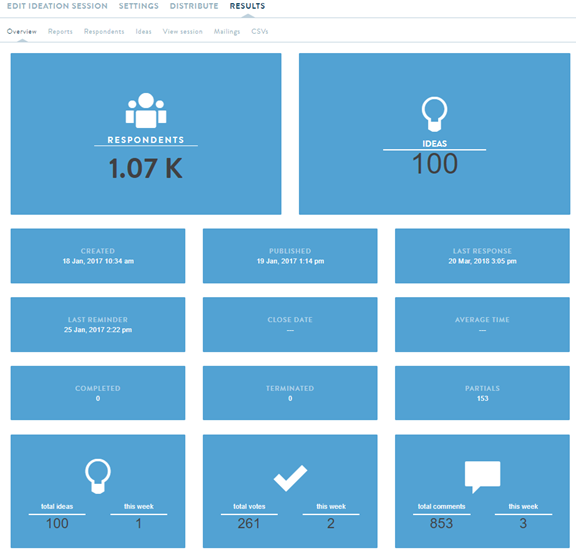
Ideas: The total number of ideas that have been posted are currently active (meaning a posted idea has not been deleted). If an idea has been deleted, this will not count towards this number.
Total Ideas: The total number of ideas that have been posted are currently active (meaning a posted idea has not been deleted).
- If an idea has been deleted, this will not count towards this number.
- "This Week" reflects ideas which have been posted for that week.
Total Votes: The total number of votes that members have clicked for any given idea and/or comment throughout the duration of the activity. It does not include votes for deleted ideas.
- "This Week" reflects votes which have been clicked for that week.
Total Comments: The total number of comments that have been posted for any given idea throughout the duration of the activity. It does not include comments for deleted ideas.
- "This Week" reflects comments that have been posted for that week, the previous 7 days.
Note: Ideation Sessions do not show "Average Time" since members have the discretion to post ideas, comments, and vote at any point during the allotted window when the activity is Active.
Journals
Nearly all of the Results Overview information for Surveys/Focus Groups are also shown for Journals. The following covers one section which is unique to Journal activities.
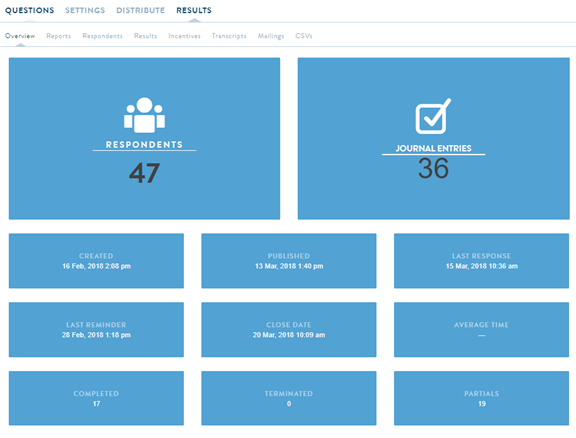
Journal Entries: The only difference Journal activities have when it comes to the Results Tab – Overview landing page is the "Journal Entries" section. This section shows the total number of journal entries that have been finished and submitted.
- Keep in mind that the above 36 Journal Entries does not mean N=36 members submitted entries, but rather that 36 total entries have been submitted. The "Completed" section shows the actual number of members who have finished and submitted an entry.
- Incomplete journal entries will not count towards the "Journal Entries" (nor the "Completed") sections. The number of incomplete entries will be reflected in the "Partials" section.
- Journal Activities do not show "Average Time" since members have the discretion to submit multiple journal entries at any point during the research duration when the journal is Active.
Comments
0 comments
Article is closed for comments.