
The discussion guide design and number of questions is determined by the objectives of your research. But be sure to design the guide with the expected duration of the live chat session in mind, and how many members are expected to participate. You may consider to have optional questions or questions that can be skipped if you are spending more time at the most important question.
Length of Guide
- A shorter session (20-30 minutes) will typically have between 10-15 questions, plus follow-ups and probing.
- A longer chat session (45 minutes – 1 hr.) will typically have between 15-25 questions, plus follow-ups and probing.
Typically for this activity, question types that elicit lengthy open and verbatim responses are used, which will mean a longer session, especially if the conversation is robust and heavy on probing.
When developing your questionnaire, be sure to focus on in-depth open-ended questions. Avoid questions that will elicit a Yes/No (Y/N) response. You can of course program Y/N questions, but you will want to include additional follow-ups/probing to help flesh out the responses. Typically, structured questions are programmed with the intent of capturing the data on the back end in chart-form in tandem with follow-up questions.
NOTE: If you are missing a question / need to program a close-ended question during the live chat session, you can always go back to the question editor and add the question and “Sync” with the live chat so it can be published.
A research priority is making sure the discussion guide questions are mission critical so that the main research objectives are fulfilled within the intended duration of the chat. Pre-programmed questions should be the core questions needed to be asked.
Make a note in the word document of the guide, which questions are mission critical and confirm with your client. This will help you stay efficient and on time during the session. Every live chat group will be different, so be sure to ask your most important questions early in the chat. If members give robust answers and you want to probe further, you may not get a chance to ask all of your questions in the allotted time. Other groups may answer very quickly and succinctly so you will want to be sure to have additional questions (and probing) to fill the time slot.
Welcome Message: Be sure to include a "Welcome Message" at the beginning of the guide, which helps welcome and get members settled in for the session. At this point members can introduce themselves and start interacting. Be sure to mark the first question as an "Open Essay" and NOT a notification. Members will NOT be able to provide comments/use the chat box at the bottom of the screen (notifications only provide information – no interaction or actual “chatting” will take place since the “chat field” is closed). See below for an example.
Probing: Be sure to include clearly marked probing questions in the discussion guide so that follow-up questions and nuances are captured. This also helps moderators understand the goals of the client.
Testing the guide: As best practice, moderators should perform test runs similar to an actual live chat session. This allows the session flow works, the questions are programmed properly, and do a rough check on timing.
Question Types
Live Chats allow for the following question types:
- Open
- Notification
- Single Select
- Rating
- Multiple Select
Matrix tables or logic are NOT available in a Live Chat.
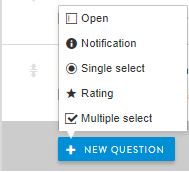
- Open: This question type allows you to facilitate a conversation once posted.
- Notification: Allows you to post a message/information to the members without allowing for discussion. A notification is useful when providing transitional information or a final "Thank You" message which re-iterates gratitude to the members, incentives and timing, and any potential follow-up questions/contact information. Members and moderators are UNABLE to chat when notification questions are published.
- Single Select: Allows you to post a multi-choice question with only 1 response allowed.
- Rating: Allows you to post a question to members to provide a rating. You can use stars, smiley faces, and other icons as your "rating system."
- Multi Select: Allows you to post a multi-choice question with multiple responses allowed.
Comments
0 comments
Article is closed for comments.