
If you are using the platform with integrated Tango incentives for your community, the Incentive Tab is the place for you to keep track of your incentive balance, paid incentives and pending incentives to be distributed to members. The following explains features and info available in the Incentive Tab.
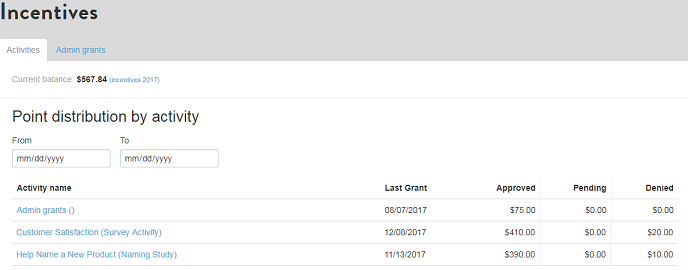
- Current balance: Amount of incentive balance left to distribute to members. If your balance gets low, contact your account manager to transfer additional funds.
- Point distribution by activity: Is the main part of the tab. Each activity for which you have set up incentives is listed. Additionally, you are able to grant incentives that are not linked to activities. They are listed under the heading "Admin grants".
- From - To: Enter from and to dates to filter which activities you want to display.
- Activity name: Displays name of the activity.
- Last Grant: Displays the last/most recent date incentives were granted for the activity. Clicking on the activity name will open a screen with more details. If you distributed incentives more than once, info on each can be viewed (this might be useful if you have an ongoing activity running for a long period of time and you want to incentivize members on a rolling basis, e.g., once per week).
- Approved: The amount of incentives approved, i.e. distributed to members.
- Pending: The amount of incentives pending. Members "earned" the incentives by completing an activity, but incentives have not been distributed (granted) yet. Typically, you want to review the responses for quality before distributing incentives.
- Denied: While respondents tend to be more engaged in communities, sometimes members do not put the time in to answer qualitative questions thoroughly. In this case you can deny incentives for individual members. The amount denied is displayed in the denied column.

- Totals: At the bottom of your list you get the total of approved, pending, and denied incentive amounts.
- Download full history: Downloads the full incentive history. Note that filtering of incentives does not apply to this download.
Comments
0 comments
Article is closed for comments.