
CLOSING YOUR SURVEY
You can close your survey by manually selecting close from the status field of your survey...
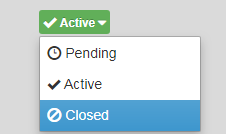
... or you can set the close criteria in the Settings Tab of your survey.
This also where you can update the "Closed message". This is the message members will see if they try to complete the survey after you have closed it for data analysis.
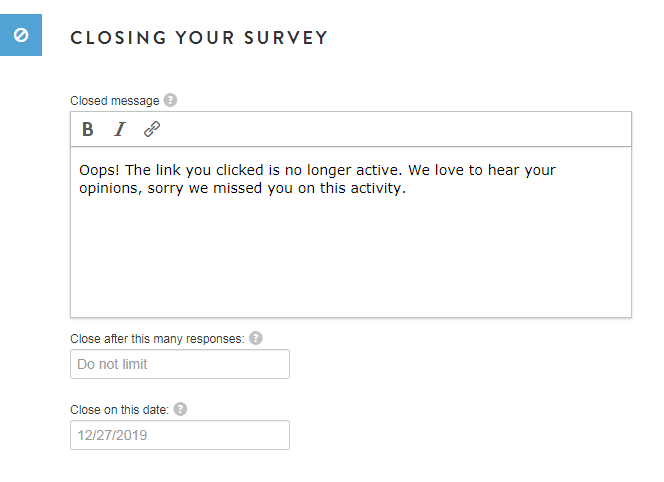
You have the option to:
- close the activity automatically by setting a number of responses, i.e. completed surveys.
- select a close date. If you choose the "close on this date" option, the survey will close 1 hour after Midnight CST of the date you select.
The activity will show as "Active" until it is manually closed by the community administrator.
Note: Be mindful of your sample management. If you have a lot of respondents completing a survey at one time, you may go over your set number of responses or close date. The survey will NOT prevent active respondents from completing their active survey session.**
For example, if you set your survey to close after 100 completes, and you currently have 90 completed surveys and 30 members going through the survey, they will all be able to complete the survey before the software will prevent new entrants to access the survey. This means, only send as many invites as you expect to need to achieve your completed surveys. Consider your audience and past response rates. Don't blast out to your entire community.
Technical Details: A respondent is considered active if he/she submitted a response to the survey in the past 30 minutes. A respondent who submitted his/her last response 31 or more minutes ago is inactive and considered to re-enter the survey and won't be able to do so if the maximum completes or date cap has been set and met.
**If you notice that the activity was closed, but the icon won't change from "Active" to "Closed", that is because there are active participants in the survey who entered prior to the activity being closed. At this point, there is a 30 minute window after closing the activity, for current participants to complete the survey and count as a complete. If they drop off or do not complete the survey within 30 minutes, they will be disquailified and would not have te oppurtunity to re-enter to resume the survey.
Comments
0 comments
Article is closed for comments.